- Power On as normal.
Calibrate as normal
At treatment screen zero out pulse count by pressing the pulse reset button
Press emergency button in and screen will show that device is Paused. -
Imagine these squares at the bottom third of the screen
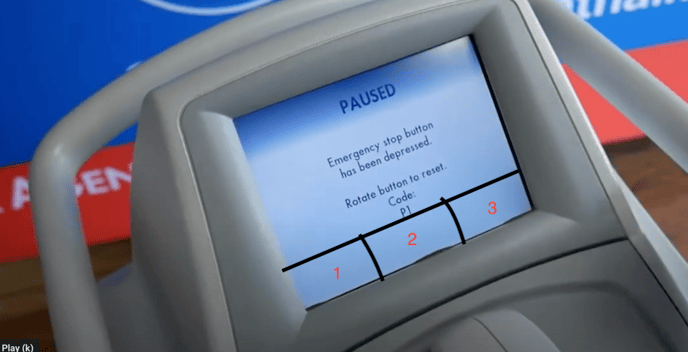
- Press buttons 3 2 1 2 3 3 3 and the service screen will appear.
-
Select Service and then using the same imaginary buttons at the bottom press the following: 1 1 2 2 3 3 2
-
The screen will return to Pause screen with the letters “D” and “S” in the upper left and right corner.
-
Release the emergency stop button
-
Treatment screen now how “D” and “S” in the upper corners.
-
Press “D” to get Diagnostic shot count and “S” for Diode condition.
English
![MNML Aesthetics text logo-2.png]](https://www.mnmlaesthetics.co/hs-fs/hubfs/MNML%20Aesthetics%20text%20logo-2.png?height=21&name=MNML%20Aesthetics%20text%20logo-2.png)